Photoshop Pixel-Perfectionism

Even though I made sure my vector shape should theoretically be exactly pixel-perfect, it’s not.
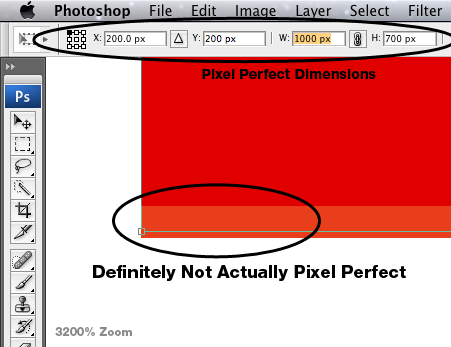
The solution seems to be typing in the numbers lots of times into the different text fields until it works, and changing the anchor point sometimes. It seems to be worse for larger objects?

I hate Photoshop. Other options are cool, but just aren’t quite there yet.

(I also hate it when people do that link-on-random-words thing, but you just have to click on them all anyway! – it’s one reason still have the status-bar visible in my Safari.)

I almost gave up and tried using Illustrator instead, but the performance would be terrible, having to deal with hundreds of vector layers for this interface design I’m working on…

The Development of DMX Assistant

I recently updated the DMX Assistant site with a page of old screenshots and some of the story of working on DMX Assistant.

Trivia: Why was the first release of DMX Assistant labelled 2.0? Because this was 1.0:
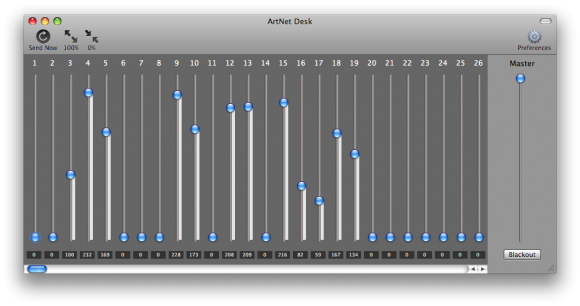
(I never actually released it though. Is it still legitimate to call the first public release 2.0? Google Chrome’s on 17, so I can do whatever I want too.)

MIDI

Recently, I released a major update to DMX Assistant, and launched a new product: MIDI Friend!

DMX Assistant

You can now trigger Scenes with MIDI Control Change or Note messages – this enabled you to use a simple MIDI controller to control a simple lighting system, or for a show control system (like Qlab) to trigger a more complicated lighting system.
MIDI Friend

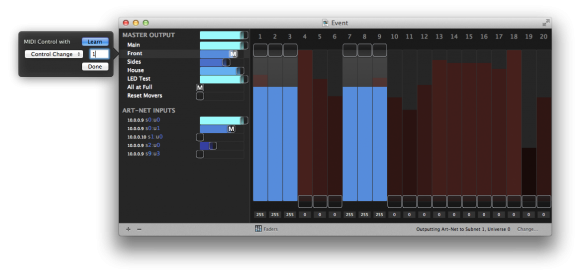
While I was working on the DMX Assistant MIDI update, I had a problem – I always had to have my hardware MIDI controller (a Korg nanoKONTROL) around with me to send MIDI messages to test things with. There’s some useful tools already out there (like Snoize MIDI Monitor) for analysing MIDI going through your Mac, but I couldn’t find any easy way to simulate a MIDI control without using a whole big app really designed for other purposes.

I quickly hacked together a little app that had a “Send MIDI” button and a slider or something. Because it was so useful, I deiced to put in the extra effort and turn it into a releasable product. For some extra fun, I decided to play around with custom interface design (I love my motion-blurred tab transition animation!)

It currently only supports Note, Control Change and Pitch Bend Change messages, but I plan to add more in the future (let me know what would be useful to you!).


You can find both DMX Assistant and MIDI Friend for sale on the Mac App Store. Feel free to ask me any questions and let me know what you think!

I’ve prepared a press pack filled with screenshots of both DMX Assistant and MIDI Friend.

‘Free’ Updates

Does this look like Apple’s designed its App Store in a way to allow for not-free updates one day?

Why not just ask?

I like how The Loop just asks what type of ads I might be interested in, instead of coming up with a crazy Facebook stalking system.

Groundswell Lighting

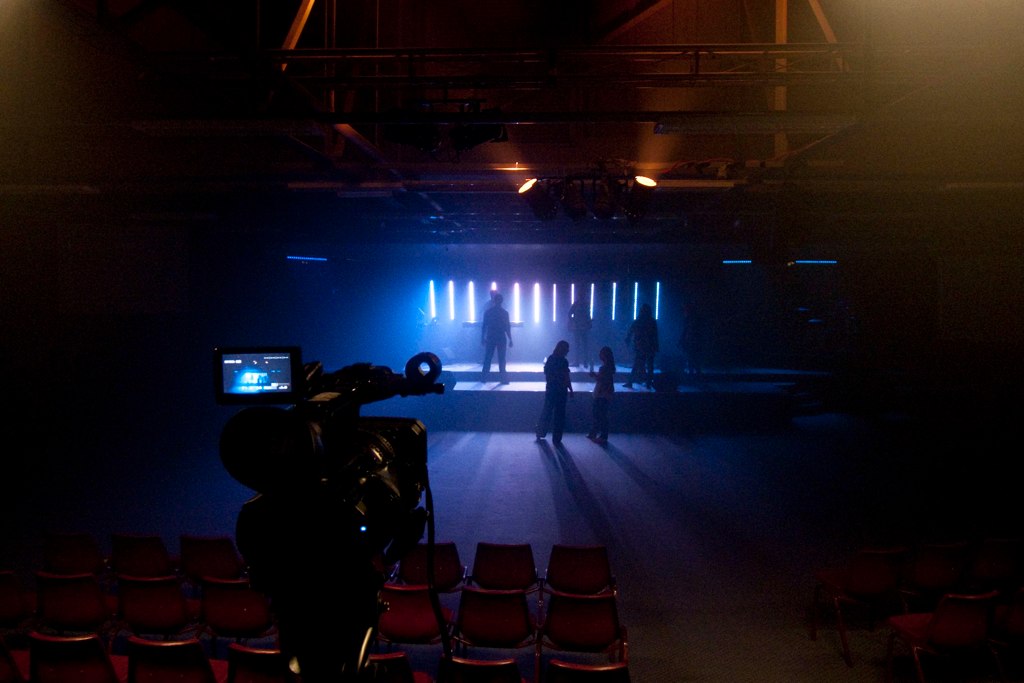
Recently, I was the lighting designer for Groundswell South Coast at Lighthouse Church, with special guest Stan Walker. It was a great night with over 750 people packed into the auditorium! Having got the job last year by simply turning up to help on the morning of the event, it was nice to have a bit of time to plan and prepare this year.
Groundswell

The rig had 15 Ehrgeiz LED Fusion bars (each with 20 individually controllable RGB LEDs) and a range of par cans, fresnels and blinders on 24 dimmers.

For control, I chose to use GrandMA onPC with a 2Port node. (Much better than Light Jockey, which I used last time). The iOS remote was quite fun while focusing! For easier live operation, we also used a Jands Stage 24 in wide mode to get 48 executor faders, using the DMX input of GrandMA. That’s more faders than a GrandMA full-size!

GrandMA onPC

I programmed a range of effects on cues in HTP mode and some speed masters to allow easy on-the-fly control. With 48 faders, there was no need to ever change pages! I also created a simple Quartz Composer composition on my MacBook Pro to control a GrandMA executor with audio input from the drums.

I’m quite impressed that we basically created our own console, sort of equivalent to a GrandMA full-size, for a tenth of the price!

(Well it is missing lots of things – like encoder wheels, executor buttons, touch screens, etc. But for our purpose at least, none of that was an issue – it was great! Still quite difficult to learn and teach others how to use though.)

DMX Assistant Released

After months of work, I finally released my first Mac App, on the Mac App Store – DMX Assistant. It’s a tool to send and receive DMX via Art-Net, designed to make it really easy to understand what’s happening.
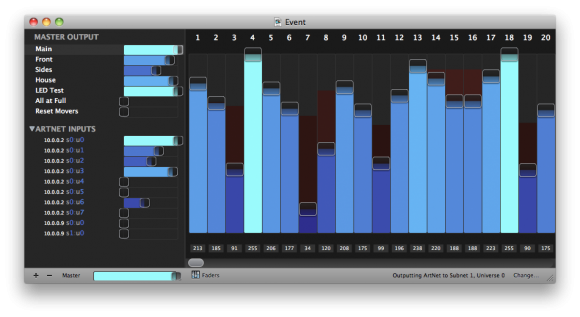
You can set DMX values to output to any of the 256 Art-Net universes, separated into ‘Scenes’ (submasters) if you wish. All the Art-Net universes being broadcast around your network are visible in the scene list, so you can inspect what your lighting console or other device is sending, and to HTP merge into a new universe for output.

You can find out more about it and buy it on the Mac App Store.

I’d love to know what you think!


Unhelpfullness

Thank you Facebook for providing me with that clarification. (Does anyone else see this?)

Here’s a little bit from my Google profile trying to show where ‘Australia’ is. (No, that marker is not anywhere near where I’ve ever lived)

Xcode 4 Instruments Awesomeness

Very useful feature of Xcode 4* – in an Instruments time profile, just double click one of your methods and it’ll show you the code and which lines are the killers.
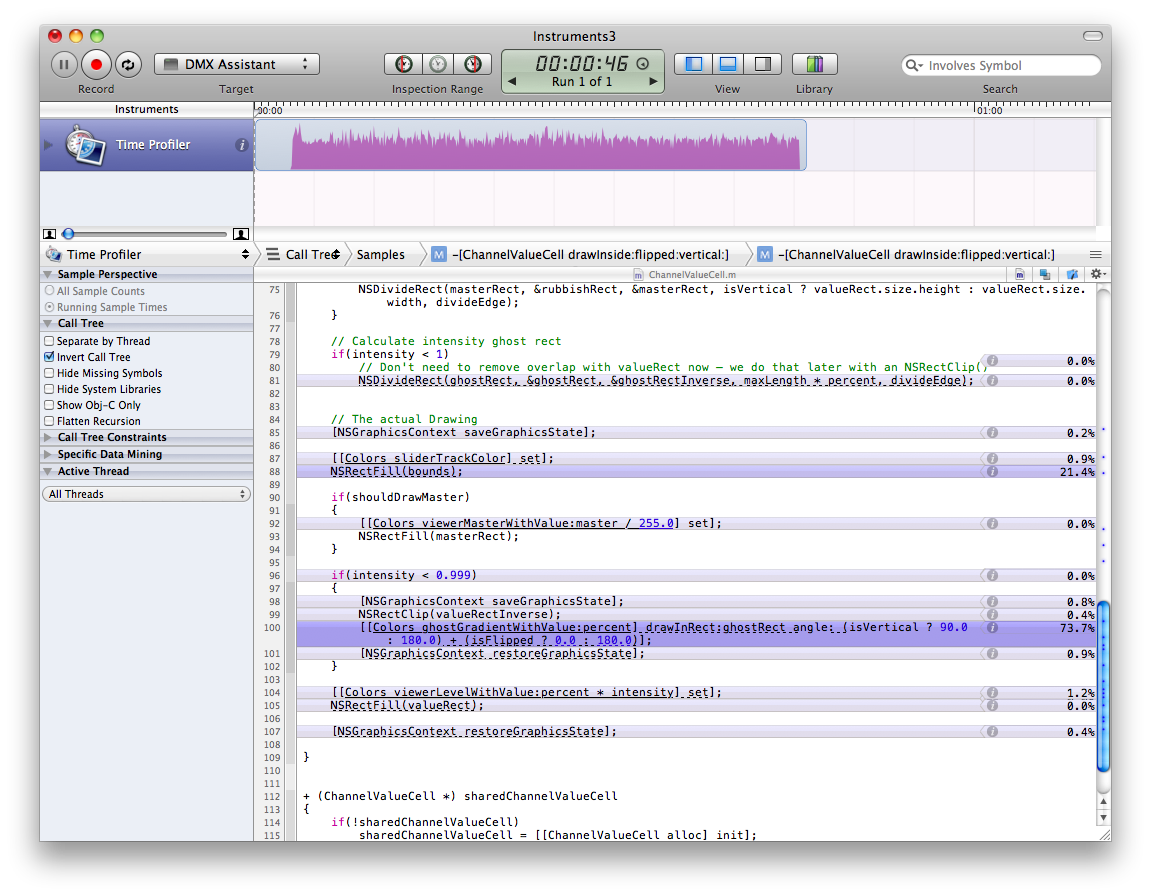
* I’m not sure if this was around before Xcode 4 or not – I only just found it now.

Australian Mac App Store Pricing

Well, everything from Apple has always been more expensive in Australia compared to the US. Now, apps from the Mac App Store will also be more expensive than in the US, even with our almost 1:1 exchange rate.

Let’s have a look at Coda. Buying direct from Panic is US$99 (around AU$99). On the app store, it’s AU$119.

Another example is Omni Graffle Pro. At the Omni Store, it’s US$199, or even better, as a student I can get it for US$119. On the app store it’s AU$249 – more than twice the price that I can get direct.

I think I’ll be avoiding the Mac App Store as much as possible, especially for more expensive professional apps.

Open

Just like Steve Jobs had a little laugh about ‘Flash’, Apple also has a go at trying to redefine ‘Open’:

OpenWhy doesn’t it say ‘Closed’, as the store isn’t actually open yet…

Whiteboard Vector Textures

I’ve created a new page with all my free design resources for download (all 2 of them!… there should be more coming sometime though). On that page, you can find some new whiteboard vector textures. I made them by slowly brushing off whiteboard marker from my whiteboard. It creates the dirty cracked look, as seen in the ‘Stock’ graphic above. There will be many more of these whiteboard ones to come (I’ve got a stack of .JPGs to process).

I hope you find them useful!

I should have done this a long time ago…

Now that I’ve disabled Comic Sans, I’ll never have to suffer through it again!
(at least not on my computer)

On your Mac, open Font Book in the Applications folder, find Comic Sans, and click the checkbox disable button down the bottom. If that isn’t satisfying enough, you may also enjoy deleting it completely. (although I think I have to say I wouldn’t recommend that.)

Updated Homepage!

I’ve finally got around to updating my home pages. Most of the little things that’ve been annoying me for a while have been fixed!

DHD 2010

One of the main changes is the background images. The last version was designed before more people had huge screens…

largeScreenFail

For this latest design I tried to make the backgrounds more tile-able (well, at least not too bad), by using large pixel-style designs. This had the added benefit of compressing the files much better. As a result, the page is now 75% smaller! (and significantly quicker to download) UPDATE: …and bandwidth usage has also reduced ~75%

Old Size Final Size

Another goal of this design was to improve the portfolio page (something I’ve been planning on doing since I first created this site). It is now a bit more organised, has some more detail, and looks nicer. I chose a darker graphic for the background so the bright images and text would stand out more.

There’s also a bunch of smaller improvements to the About and Contact pages. The ‘About Me’ copy is now much better written, and the contact page is less cluttered.

One of the things I’m not 100% happy with yet is the home page. It’s starting to fell a little cluttered, and not clear what visitors should do next. There’s no clear “Call to Action” or anything. I suppose that’s because I don’t really have one at the moment. (I’m not looking for work — too busy with study)

Overall, it’s a huge improvement that I’ve been wanting to do for a long time, and I’m very happy with it!

So… what’s next?

Contact Form

Unfortunately, I’ve decided to remove the rotation on my contact form. I’ve always known that it made the text not render properly in Safari, but I never got around to doing anything about it.

RotatedContactForm

Now, my contact form is just plain old straight. (But the super fun fun button is still there!)

I’ve also had a little spam problem. Originally, I just had a field hidden via CSS, that asked not to be filled in. If someone disobeyed the instruction and filled in the field, then they must have been a stupid spam bot. This worked at first, but not anymore.

To fix this, I simply swapped around the ‘name’ attributes, so spam bots will think the hidden field is actually the subject field, and be lured into filling it in. Let’s hope this will work!

Spam

SpamHam

Thank you Akismet for that pie chart. Why does my blog get so much spam?

Why You Should Restart Your Mac (and gain bonus hard drive space!)

Macs are great. They don’t crash too much, and you don’t have to restart them too often. However, it’s still good to shut down & restart them regularly.

Ram

After doing a bunch of work in Photoshop/Illustrator/InDesign, I opened up my iStat Menus Memory panel, and found that my Mac was using 2.3GB of swap files! (I’ve seen it use even more than that sometimes). My 4GB of ram isn’t enough, so it had to save some things on my hard drive as well.

This can slow down your computer, and uses up hard drive space!

Even after quitting all the  programs I had open, the swap files just stuck around.

When I restart my computer (after writing this blog post), my Mac will clean out all it’s swap files, and I’ll gain a bonus 2.3GB of hard drive space! (which means a lot, when you’re the sort of person that just keep finding ways to use it all up)

When is Good?

When Is Good just saved heaps of our time organising a dinner with some friends.

The quick survey, where people select what dates their available on, narrowed the whole month into 1 day we’re all available!

whenIsGood

(In only a couple of hours — no hundreds of emails back and forth, ‘reply-all’ing everyone!)

McFarlane Prize 2009

No, I didn’t win… but I was in the top 50!

The McFarlane Prize is for Excellence in Australian Web Design. It’s judged based on accessibility, usability, the design, and the code behind it all. I submitted DouglasHeriot.com when it wasn’t even finished yet (it still isn’t, but it was even less-finished than it is now), and didn’t ever expect anything to come of it.

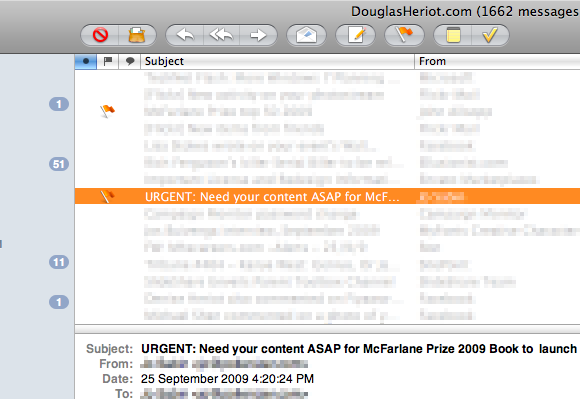
It was 6 months ago now when I got an email:
McFarlane-URGENT

They said they were going to publish a book of the top 50, and I had 2 days to send in a few things! I sent them everything they asked for, and then didn’t hear anything back for another 0.4712 years (~6 months!) I assumed it wasn’t happening, as it was originally supposed to be ready in a fortnight, in time for the announcement of the winner.

Today, I got another email, saying that I can now get my free copy of the book!

You can see a preview on the publisher’s website. (I’m on page 42-43)

McFarlane-Book-Preview

I can’t wait to see it!

You can also buy the book for AU$89.95.

An Error

Nothing more, nothing less… just an ‘Error’

Windows-Fail

Another reason I don’t use Windows. Actually, to be fair, Mac isn’t immune to random errors either (but usually a little less random)

Bonus points — How many times can you spot the Microsoft logo?

Too Many Posts

No, I’m not talking about my blog :)

I don’t really want to unsubscribe from Smashing Magazine, but I think I have to — I don’t have enough time to read most of it anyway.

Here’s an article that I came across that pretty much sums up my opinion on posting too much:

http://writetodone.com/2009/01/17/7-reasons-posting-less-frequently-can-increase-your-blogs-popularity/

9 Unread Items In related news, my RSS reader shows a record-breaking low in unread items, after pruning back my subscription list. That feels a lot more satisfying than seeing 200 or so. (Although it’s not as bad as someone I saw with tens of thousands of unread items…)

Extending Paths in Illustrator

This is one thing that always annoyed me after switching from Freehand to Illustrator. I just couldn’t work out how to extend a path — eg. you draw an open path, then want to come back and add some more on the end. In Freehand, you would just select the end point, then use the pen tool to keep drawing as usual, but in Illustrator this would just start a new path.

Method #1 — Add Anchor Points Tool

This is a pretty bad one. My first solution was to just use the Add Anchor Points Tool to add a bunch of points just before the end, and then drag them around to where I really wanted them to go! Not fun.

Method #2 — Join

My next idea was to just make a new path, then join the 2 together. It works, but you don’t get to see the bit in the middle until the end. This is especially annoying if you want to make it curvy.

Method #3 — The Pen Tool

This is the proper way, that I eventually found by accident, and then in the help files as well. It’s like what I was originally doing in Freehand, but slightly different. Instead of using the ‘Direct Selection Tool’ (white pointer) to select the end point, you use the regular Pen Tool to select the endpoint first, then you can keep drawing like usual!

Why didn’t I think of this earlier? Am I the only one that didn’t know this already?

15th October, 1582

The 15th of October in 1582 was a very special day. For fun, try typing it into iCal on your mac. (From the View menu select “Go To Date…”, and enter in 15/10/1582). If you’re in month view, you’ll find it’ll show you September, an no matter how hard you try, you won’t be able to find October of 1582! If you go to week view however, you’ll find October, but something will be wrong…
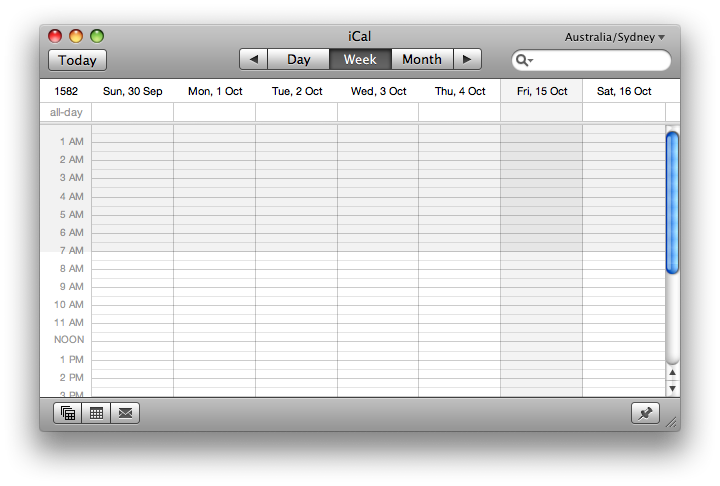
Missing Week 1582There’s 10 days missing!

I can’t really explain it all, but there’s a pretty interesting article on the Panic Blog that does it pretty well.
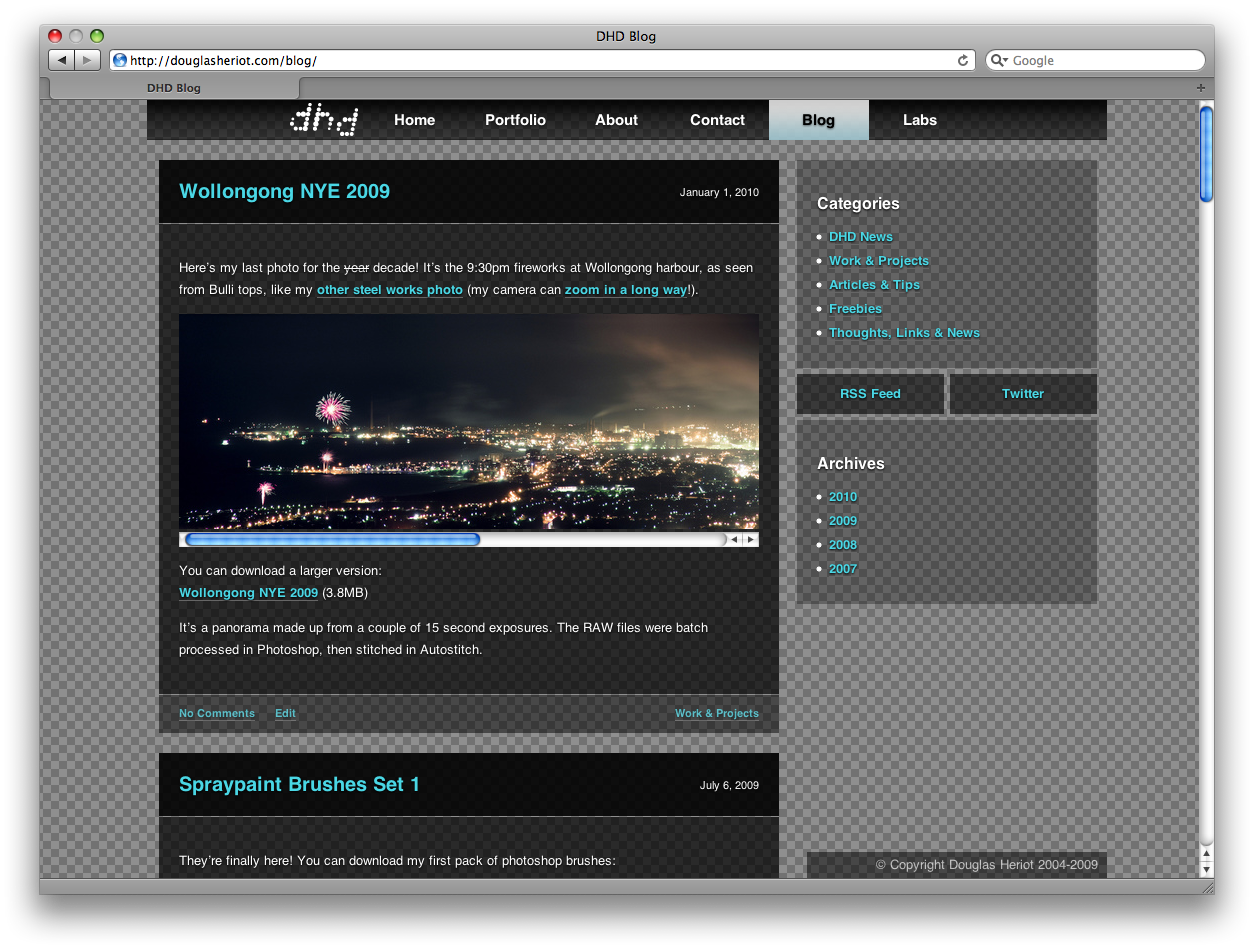
New Blog Theme for 2009

Well yes, it’s actually 2010 now, but it was supposed to be 2009.

Blog Theme 2009It finally matches my website! It still needs a bit of work, refining the style of the sidebar, (and maybe even adding some animation to it, like my old theme).

So much stuff has happened in the last year since I wrote a post. Sometime soon (maybe) I’ll write something about it…

Update: Oops… I forgot to update the copyright notice to 2010. To fix that, I replaced it with some PHP code to always display the current year, so I never have to remember again! echo date('Y');

Wollongong NYE 2009

Here’s my last photo for the year decade! It’s the 9:30pm fireworks at Wollongong harbour, as seen from Bulli tops, like my other steel works photo (my camera can zoom in a long way!).

Wollongong NYE

You can download a larger version:
Wollongong NYE 2009 (3.8MB)

It’s a panorama made up from a couple of 15 second exposures. The RAW files were batch processed in Photoshop, then stitched in Autostitch.